WhitelistVideo Review 2026
 4.5 / 5
Starting at $4.99/month
Overview
With kids spending hours on YouTube daily, many parents are finding that standard filters and automated moderation are not enough to keep mature content, comments, and addictive infinite-scrolling Shorts away from their families. WhitelistVideo addresses this issue with a zero-trust model: rather than filtering out inappropriate content from YouTube's massive library, it blocks everything by default and only plays videos from channels that parents have explicitly whitelisted.
During our 30-day hands-on evaluation of WhitelistVideo on an iPad and an Android smartphone, we found its specialized filtering mechanism to be incredibly robust. It eliminates the algorithmic rabbit holes, blocks all auto-playing Shorts, removes distracting comments, and silences ads. While general parental control suites try to monitor everything across a device, WhitelistVideo focuses purely on mastering YouTube safety, making it an indispensable tool for families seeking absolute peace of mind.
Features
Channel Whitelisting
The core strength of WhitelistVideo is its absolute channel whitelisting. Rather than relying on automated category filters, parents add the exact channels they want their children to watch by entering their URLs in the dashboard. If a video does not belong to an approved channel, it will not play, period.
Shorts Blocking & Clean-up
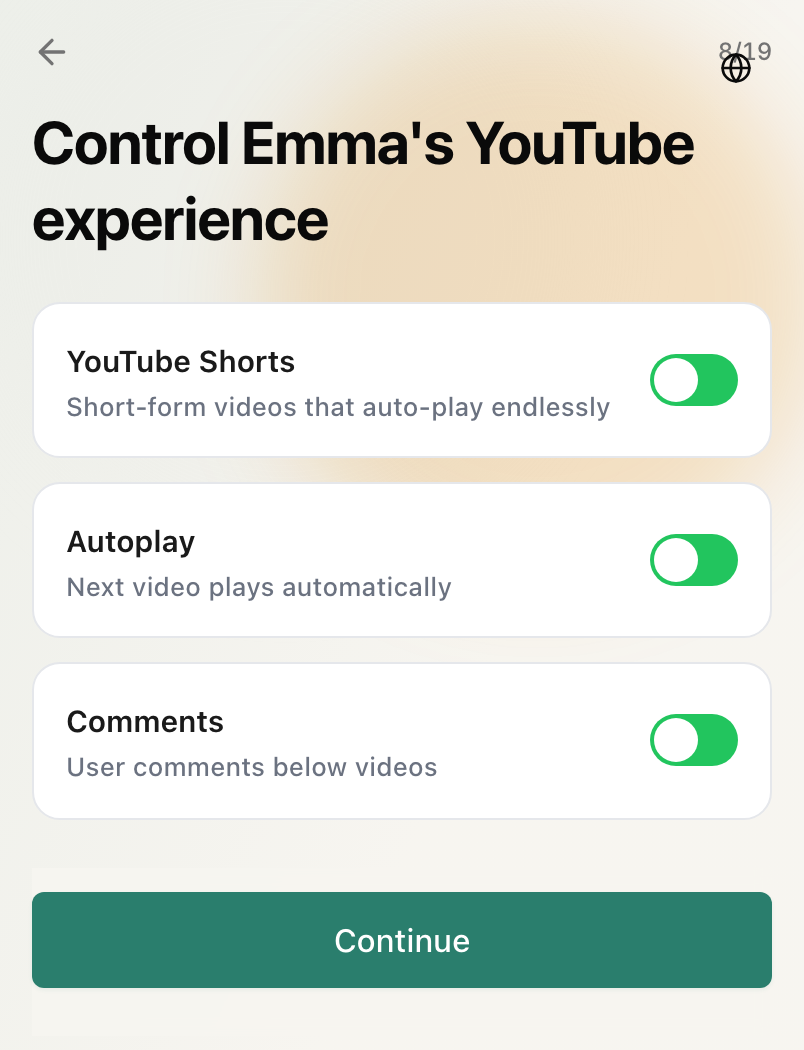
With a single toggle in the parent dashboard, WhitelistVideo completely removes YouTube Shorts from the interface. It also strips away comments, blocks downloads, and hides ads, turning YouTube into a clean, educational viewing environment without infinite-scroll rabbit holes.
Bypass-Proof Protection
Many smart children easily bypass standard parental controls by using private tabs, switching Google accounts, or deleting profiles. WhitelistVideo features a bypass-proof Advanced Protection system that locks down settings. It remains fully active even if the child knows the parent's device passcode.
Pricing
Monthly Plan — $4.99 per month
Provides full access to all features, including unlimited whitelisted channels, Shorts blocking, comments hiding, ad blocking, and cross-device sync. You can cancel at any time.
Annual Plan — $39.99 per year
Billed annually, this plan breaks down to approximately $3.33 per month, saving you over 30% compared to the monthly subscription rate.
What We Like
- True zero-trust channel whitelisting prevents any unapproved videos from playing.
- Blocks addictive Shorts, comments, ads, and downloads with a single toggle.
- Bypass-proof protection stays secure even if children know the device passcode.
- Fast and seamless syncing of approved channels across all family devices.
Room for Improvement
- Requires manual, upfront setup effort to add approved channels.
- Does not offer general device screen time limits or location tracking.
How It Compares
Last compared: July 2026
| App | YouTube-Specific Controls | Shorts Blocking | Channel Whitelisting | Bypass Protection | Price |
|---|---|---|---|---|---|
 WhitelistVideo WhitelistVideo |
Yes — Excellent | Yes — Single Toggle | Yes — True Whitelist | Yes — Bypass-Proof | $4.99/mo |
| Bark | Monitoring & Alerts | No | No | Moderate | $4.99/mo |
| Qustodio | Basic Category Filters | No | No | Moderate | $4.58/mo |
| Google Family Link | App Block Only | No | No | Basic PIN | Free |
| YouTube Kids | Separate Curated App | Integrated (Addictive) | Limited Custom lists | None (Separate app) | Free |
| Net Nanny | Web Filter Only | No | No | Basic PIN | $54.99/yr |
Frequently Asked Questions
No. WhitelistVideo utilizes an advanced, bypass-proof protection system. Even if your child discovers your device passcode or attempts to use VPNs or alternative browsers, they cannot alter settings or delete the WhitelistVideo profile without the master parent PIN.
No. WhitelistVideo does not offer built-in screen time limits, scheduling tools, or usage reports. It focuses exclusively on content filtering for YouTube. For general device screen time limits, you should combine it with general device managers like Apple Screen Time or Google Family Link.
Unlike YouTube Kids, which relies on automated AI filters that occasionally let mature content slip through, WhitelistVideo uses a strict zero-trust channel whitelisting approach. Kids can only watch content from channels that you have explicitly approved. It also allows parents to completely disable Shorts, comments, ads, and downloads.
If a child clicks on a recommended video or thumbnail from an unapproved channel, WhitelistVideo blocks the playback instantly and displays a friendly screen indicating that the channel is not on their approved list.
WhitelistVideo currently supports iOS (iPhones and iPads), Android devices, and Chromebooks or desktops via a dedicated Google Chrome extension, ensuring consistent protection across all family screens.
Consider These Alternatives
Bark
Best for older kids. Bark doesn't block channels, but it uses AI to monitor search and watch histories, alerting parents to cyberbullying or mature themes.
Learn More →Qustodio
Best for screen time limits. Qustodio excels at scheduling screen-free periods and limiting overall daily usage, though it lacks channel-level whitelisting.
Learn More →Google Family Link
Best free option. Integrates directly with Android to restrict app downloads and set daily usage timers, but relies on standard Restricted Mode for filtering.
Learn More →Our Verdict
WhitelistVideo is easily the most secure parental control available for families who want to lock down YouTube. Its zero-trust channel whitelisting strategy is incredibly effective, and its bypass-proof security ensures children cannot disable it. While it lacks screen time scheduling and general device monitoring, its highly focused design makes it a perfect companion to standard built-in tools like Apple Screen Time or Google Family Link. For parents who want to end algorithmic scrolling and unsafe recommendations on YouTube, WhitelistVideo is a five-star recommendation.